
Make waiting easier for everyone
Start free, with no card or setup fee. Your first queue can be ready today.
Built for clinics, banks, government offices, telecom stores, service centres, salons, and anywhere customers wait their turn.
Everything you need to manage the wait
One queue for staff, customers, and the waiting-room screen, all kept up to date automatically.
- See who is waiting and each visit status, then call the next customer with one clear button.
- Track visits, waiting times, and no-shows by date, service, and branch.
- A tablet at the entrance or the customer’s phone. Pick a service, enter a mobile number, and get a queue number.
- Shows who is being served and who is next, with ticket number, first name, and service only.
- A private link shows the customer’s place and expected wait, and updates automatically during the visit.
Key features
Core tools to organise the queue and make waiting easier for customers.
Live queue board
See everyone waiting, called, being served, and completed today on one screen. Call the next customer with one button and keep the whole queue visible to staff.
Notification before their turn
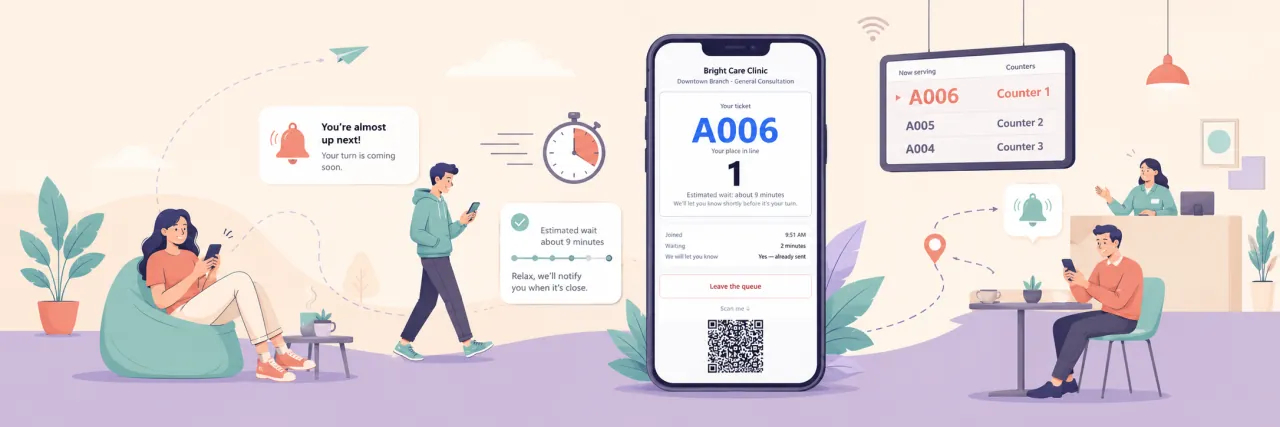
Notify customers when only a few people are ahead of them. They can wait somewhere else, keep their place, and return when their turn is getting close.
Queue status on the phone
A private link shows the ticket, place in line, and expected wait, updating automatically until the visit ends.
Appointments and walk-ins
Offer booking, rescheduling, and cancellation. When the customer arrives, the booking becomes a place in the same queue.
Automation that runs the queue
Turn on automatic calling, no-show handling, requeueing, closing, and wait estimates based on your service data.
Reports you can use
Track waiting and service times, arrivals by hour and day, no-show rates, busiest services, and how customers joined. Filter by date and branch, then export.
Your logo and colours
Use your own logo and colours on every screen customers see. Colour combinations are checked for readable contrast when you save them.
How it works
Three simple steps from joining the queue to completing the visit.
Customers join the queue
At the desk, on a check-in tablet, from a QR code, or online before arrival. Every option joins the same queue.
Customers follow their turn
Customers see their place and expected wait on their phone. They can wait somewhere else, then receive a notification when their turn is getting close so they know when to return.
See how the day went
See how long customers waited and were served, which services were busiest, and which hours had the most demand. Export the same data as CSV whenever you need it.
Who it suits
The flow stays simple, while services and queues adapt to how each business works.
What you get
Simple tools to organise the line, notify customers, and manage service from one place.
Your services create the right queues
Self check-in
Waiting-room screens
Customer notifications
Wait times based on your data
Priority and queue adjustments
Ask what you need at check-in
Recognise returning customers
Service permissions
Manage multiple branches
Arabic and English
Your data stays yours
Quick, clear setup
Plans
Start with a real queue on the free plan, then choose a plan that fits your branches and needs.
Growth
Several branches under one business, each with its own hours and screens.
Contact us
Up to 5 branches
Start freeCommon questions
- Do customers need to install an app?
- No. They join from a link, QR code, or check-in device and follow their place in a normal phone browser.
- Does the branch need an internet connection?
- Yes. TikTurn is a web app and the branch needs internet. Customers use their own phone connection.
- Can we manage more than one branch?
- Yes. Each branch has its own opening hours, queues, and screens, and staff can be assigned to one branch.
- Is TikTurn available in Arabic?
- Yes. The product supports Arabic and English, including check-in, waiting-room screens, and customer messages.
- Do we need to set up queues before we start?
- No. Set your branches, services, capacity, and who handles each service. TikTurn builds the queues from those settings.
- What if a customer does not return when called?
- Staff can mark them absent, or TikTurn can do it after a delay if the customer was first warned that their turn was near.
Start with one branch today
Add your branch, services, and opening hours, and your queue is ready for customers. No installation needed.
Walk-in queueAppointment bookingSelf check-in kioskWaiting-room screenMulti-branch managementFewer missed turns